
 Posted by
 The code from this post is available from GitHub: https://github.com/matejbob/ClientCertificateAuth.git .
Introduction
Beyond any doubt, Azure Functions became a very popular serverless solution. Simple development model and smooth integration with other components of architecture using out-of-the-box triggers and bindings rank among the biggest strengths of Azure Functions.
For the purposes of this article, Azure Functions can be divided into two categories based on the type of the client they’re intended to be consumed by:
- Web or mobile API (e.g., REST API or GraphQL): one or more Azure Functions comprise an API consumed by a user-facing front-end
- Service-to-service: Azure Function is a part of bigger architecture and as such it is invoked by other components of the system or by an external service
Distinction between these two categories is key when deciding on the authentication method. In the first case, identity of the user comes into play. If authentication is required, typically either an Identity Provider, explained below, or a custom authentication mechanism is leveraged to sign in the person using the application. On the other hand, in the second case, it’s identity of the calling component that is involved and, unlike the former, this is when certificate-base authentication is practically applicable. In other words, certificate-based authentication is usually not a feasible option for user-facing APIs.
Another important division of Azure Functions when weighing up authentication alternatives is the type of the Azure Function trigger. In this regard, Azure Function can be:
- HTTP-triggered: Function is triggered by an HTTP request
- Other (e.g. using Timer Trigger, Azure Service Bus Trigger, Azure Cosmos DB Trigger etc.)
As certificates pertain to HTTP, it’s obvious that it’s only this category of Azure Functions that can take advantage of certificate-based authentication.
From the argument given above, it follows that, in practice, service-to-service HTTP-triggered Azure Functions are suitable for certificate-based authentication. Remarkably, this type of Azure Functions is one of the most common.
Summary of alternatives
When it comes to securing an service-to-service HTPP-triggered Azure Function, these are basic options to consider:
- Anonymous: no authentication/authorization is performed, the Function may be called by anybody without any constraints
- API key: in order to invoke the Function caller must include secret API key in its HTTP request
- Identity Provider: App Service hosting the Function can use an OAuth2-based provider, e.g. Azure AD, to enforce authentication
- IP filter: when the hosting App Service is a part of Virtual Network in Azure, network traffic can be limited to specific source IP addresses, IP filtering should not regarded as a reliable security mechanism because of issues like IP address spoofing
- Client certificate: leveraging public-key cryptography and TLS, the caller presents a TLS certificate containing public key to the Function host and proves to posses corresponding (secret) private key, based on this proof the Function host concludes that the caller is the subject described in the presented certificate
The first three approaches are all well-documented on the Internet. This post focuses on the last option, namely authentication using client certificates.
Advantages of using client certificates
Authentication based on client certificates stands somewhere between the API key authentication and using an identity provider when robustness, flexibility, scalability but also complexity are considered. It should be regarded as a more secure alternative to API keys involving little additional effort rather than a fully-fledged replacement for identity provider.
In my experience, teams often choose API keys to secure Azure Functions. The main reason is simplicity of this technique. Caller includes an API key know to both sides of the communication in its HTTP requests, the Azure Function host verifies that it’s the expected API key and if this verification succeeds, it handles the request.

The important aspect of API key authentication is the fact the API key travels over the wire and, as a result, possibility of the API key getting compromised can not be ruled out. Users with sufficient permissions to read the API key value on the server side may also cause a leak of the key.
As opposed to the API key authentication, if client certificates are used, the secret which is the private key in this case is neither sent from to the caller to the Function host nor is it stored in the Function host. Possession of the private key associated with a specific TLS certificate is instead proven by the caller using mutual TLS or mTLS in short. This eliminates the possibility of the secret information getting leaked from the Function host. The function host is only aware of the TLS certificates that are permitted to invoke the Functions it hosts. Note plural here, unlike the single API key, multiple client certificates may be pinned and trusted by the Function host which allows authenticating and authorizing multiple identities corresponding to individual certificates.

We’re going to show that client certificates allow securing only selected endpoints while keeping the rest of them public, i.e., accessible anonymously. It should be relatively easy to expand this access control and manage access to endpoints per identity. However, this technique is not discussed further in this article.
Disadvantages of using client certificates
Identity providers supporting the standard OAuth 2.0 client credentials flow present a more advanced alternative to client certificates featuring higher flexibility, robustness and more fine-grained access control. Identity provider should be the first choice when the set of consumers of the Azure Function is dynamic, meaning that new consumers need to be added and existing consumers need be removed often. Also Identity provider is a no-brainer when the number of consumers is high or when role-base authorization rules are anything but simple. As it has already been pointed out, Identity provider affects complexity which can be an overkill when none of the conditions above holds true. When the set of consumer is small and relatively static, client certificates present an attractive option.
Sample code
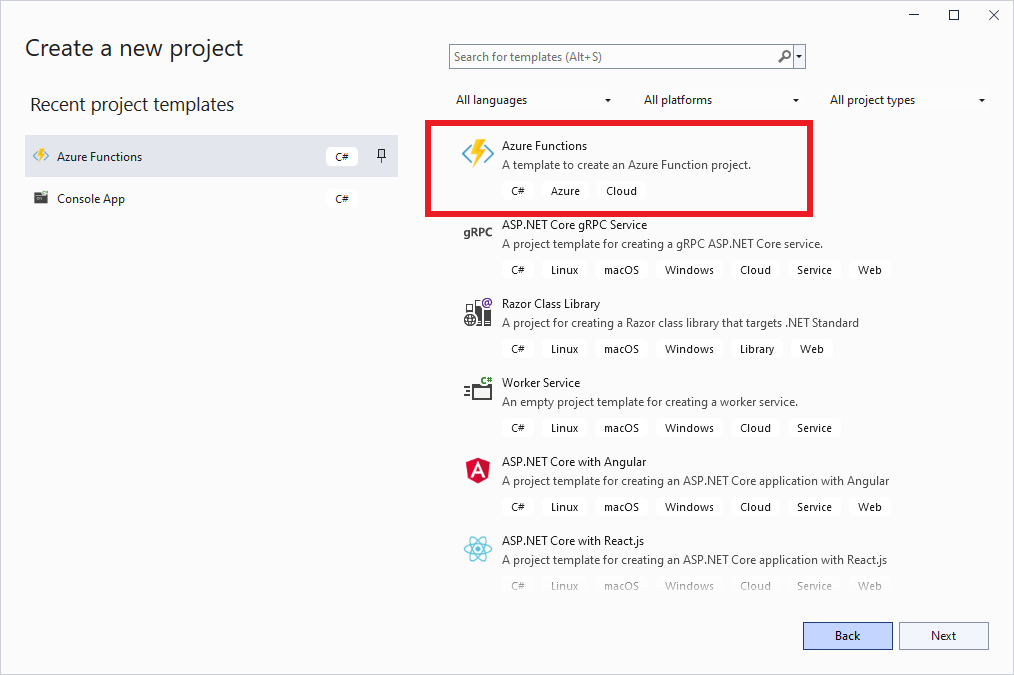
Visual Studio 2022 should be used to follow the sample code. Create a new project using Azure Functions template:
Name new project ClientCertificateAuth:

Select .NET 6.0 Isolated runtime and Anonymous authorization level:

After Visual Studio creates new project, delete the default source file Function1.cs.
In the code below we define two Azure Functions that comprise our service. The first Function named PublicFunction should be callable anonymously as indicated by AnonymousAccessAttribute. By default, when this attribute is not applied, the Function is secured using client certificates. Therefore the second function named SecuredFunction uses client certificate authentication.
AnonymousAccessAttribute definition:
Now we generate two self-signed TLS certificates that we’ll use to test the solution. The first one named allowed.pfx will be allowed to invoke the secured Function whereas the second one named denied.pfx won’t. An easy way to generate the certificates is using Powershell. In order to generate the first certificate and display it’s unique thumbprint following commands must be run under an administrator account:
$filename = "allowed.pfx"
$pwd = ConvertTo-SecureString -String "Pa@@word123" -Force -AsPlainText
$cert = New-SelfSignedCertificate -Subject TestSubject -DnsName localhost -NotAfter (Get-Date).AddYears(10)
Export-PfxCertificate -Cert $cert -FilePath $filename -Password $pwd
$cert.Thumbprint
The output of the commands will look like the following:

The other certificate denied.pfx file should be generated in the same way. Make sure to remember the password used to generate the certificates:
$filename = "denied.pfx"
$pwd = ConvertTo-SecureString -String "Pa@@word123" -Force -AsPlainText
$cert = New-SelfSignedCertificate -Subject TestSubject -DnsName localhost -NotAfter (Get-Date).AddYears(10)
Export-PfxCertificate -Cert $cert -FilePath $filename -Password $pwd
$cert.Thumbprint
The PFX files we created contain both public certificate and corresponding private key which is why they are stored in encrypted form using the password (sometimes call passphrase).
Next we need to create a class that will compare the thumbprint of the certificate(s) included in the request to the known valid thumbprints. Note, multiple certificates may be included in the request. For simplicity sake, we hardcode the allowed certificate’s thumbprint in the class but the list of allowed certificate thumbprints could be easily stored externally and obtained in the run time. CertificateValidator class is defined by the following code:
CertificateValidator object will be used in a custom middleware that will be plugged in to the request processing pipeline. The middleware will determine whether current request is targeting a secured Function. If so and a valid certificate is provided in the request, middleware will pass the request to the next stage of the request pipeline. Otherwise, request processing is stopped and HTTP status code 401 is returned. The middleware is defined by the following code. Note that reflection is used to identify the target method and to check if it is tagged by AnonymousAccessAttribute. Client certificate, or possibly multiple certificates, are contained in X-ARR-ClientCert request header set by the hosting App Service when mTLS is accomplished. As we’ll show later, this header must be set manually when testing locally. Create the file ClientCertificateMiddleware.cs containing the following code:
Now we just need to tell the Function host to add our middleware to the request processing pipeline. In order to that, modify Program.cs in the following way:
This example is simplified in many aspects. Examples of how it could be enhanced include storing thumbprints of allowed certificates externally and caching them in the host and fine-grained access control using roles assigned to identities. Nevertheless it proves the concept in general.
Testing locally
When our Functions run in Azure, X-ARR-ClientCert header will be set if and only if the hosting Function App successfully completes mTLS which will guarantee that the request is really coming from the identity associated with given certificate. To test our solution locally, we’ll mock mTLS and directly include this header in our request. In order to achieve this, we need to extract the certificate part from our PFX files using the following Powershell command block executed from the directory containing your PFX files. Note that you’ll need to provide the password used during generation twice:
foreach ($name in "allowed", "denied")
{
  Get-PfxCertificate -FilePath "$name.pfx" | Export-Certificate -FilePath "$name.crt" -Type CERT
  $crtBytes = Get-Content "$name.crt" -Encoding Byte
  [System.Convert]::ToBase64String($crtBytes) | Out-File "$name.crt.base64"
}
Two files named allowed.crt.base64 and denied.crt.base64 should be generated in the same directory. Open the latter and copy the content and use it as value of X-ARR-ClientCert header in new Postman request:
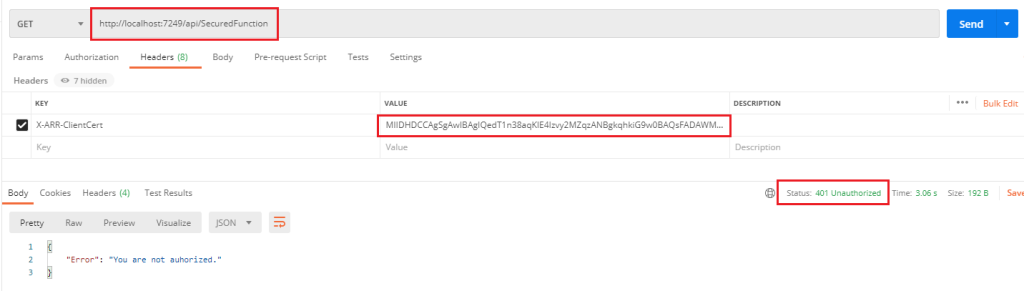
When you start the project in Visual Studio and send this request, you should see the same result, the status code 401 and the error message should be received.
Let’s validate the success path now. As a result of changing the value of X-ARR-ClientCert to the content of the file allowed.crt.base64, we should receive the following response indicating the success:
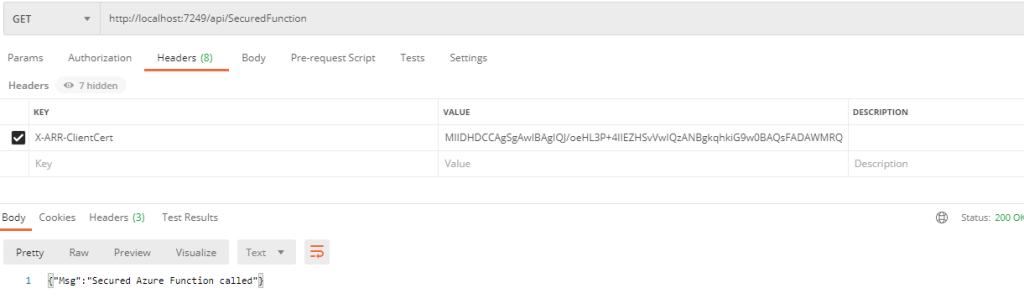
As we managed to locally verify that our authorization method works, it’s time to deploy the service to Azure and carry out a more realistic test.
Deployment
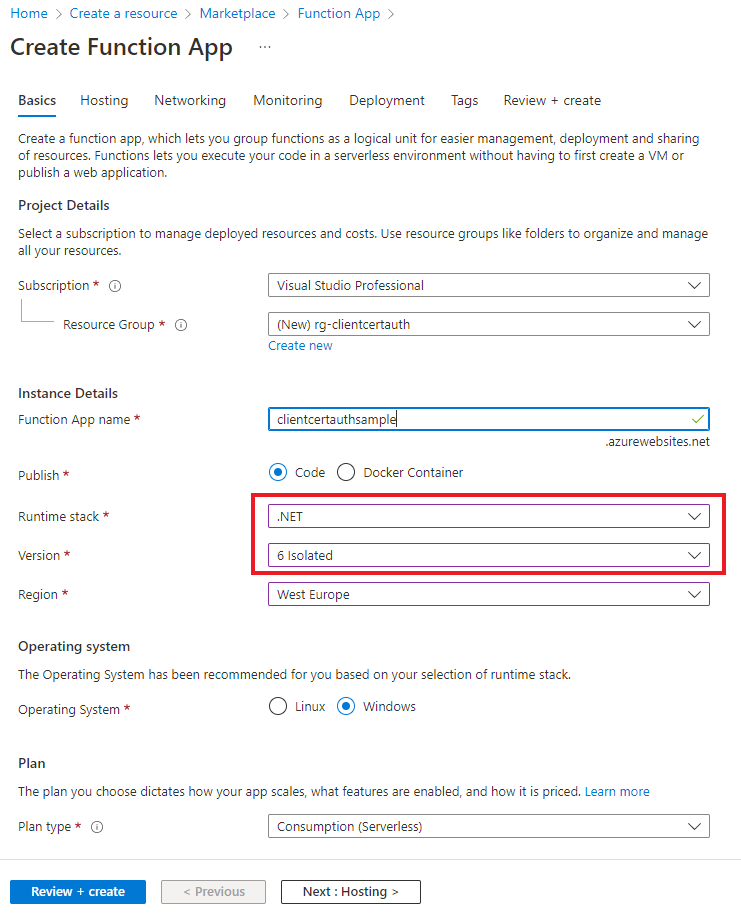
The first step is to create new Function App to host our Functions:

The default values can be kept for all options but Runtime. Make sure that .NET 6 Isolated runtime is used:
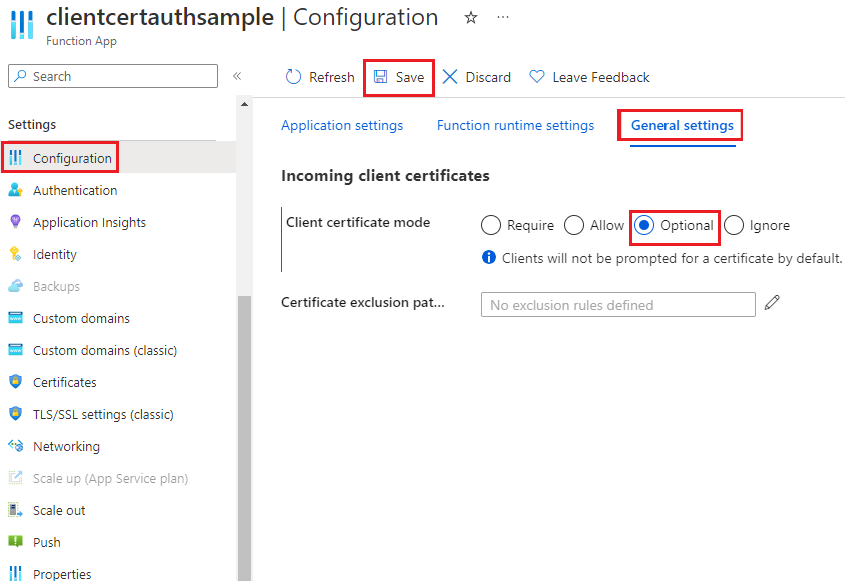
Once the Function App deployment completes, in the Configuration section, enable Optional Client certificate mode. This will ensure that no certificate will be required for public Functions while our custom implementation will enforce the verification of caller’s identity based on client certificate.
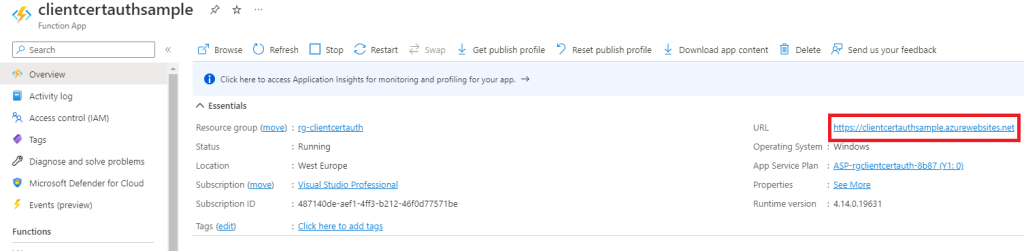
Let’s test our Azure-hosted instance from Postman. The URL base can be determined from the Overview section of the Function App:
Copy and paste the URL and send a request to our public, anonymously accessible Function:
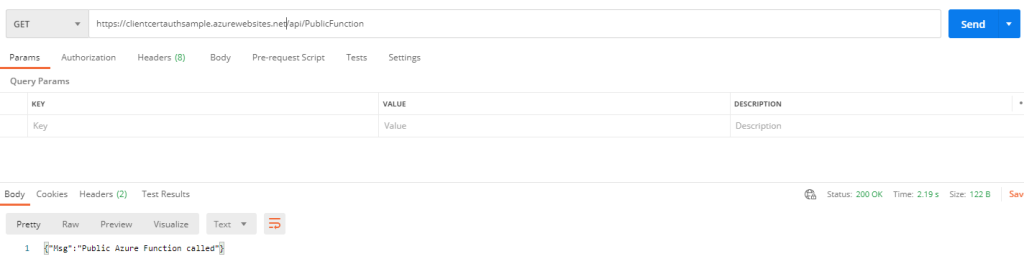
As can be seen from the screenshot, a success response is received. Now, in an analogous way, we attempt to call the secured Function:
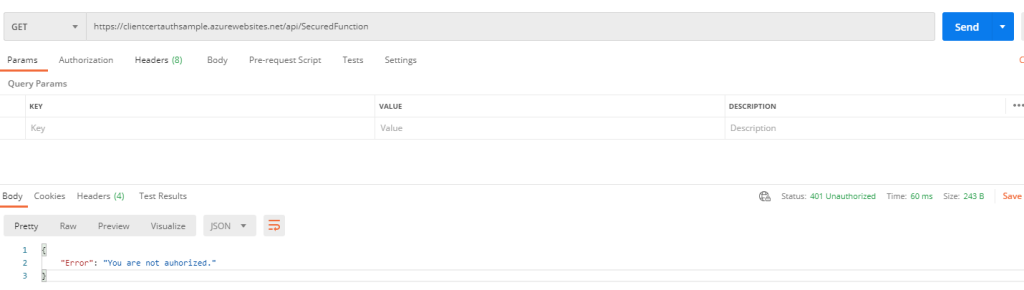
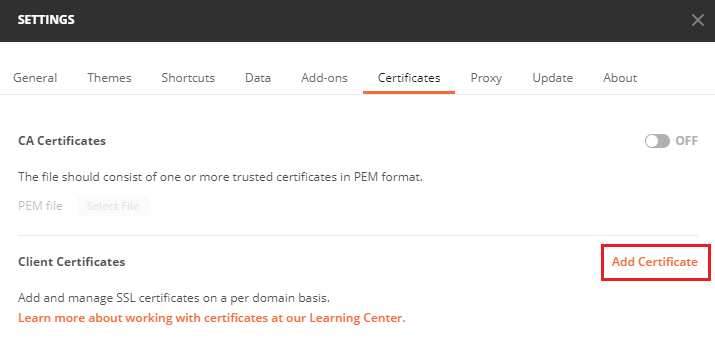
In line with expectations, the request fails with the Status Code 401. In order to make the request succeed we need to we need to prove the identity associated with the allowed certificate using mTLS. Open Postman’s settings, switch to the Certificates tab and click the Add Certificate button:
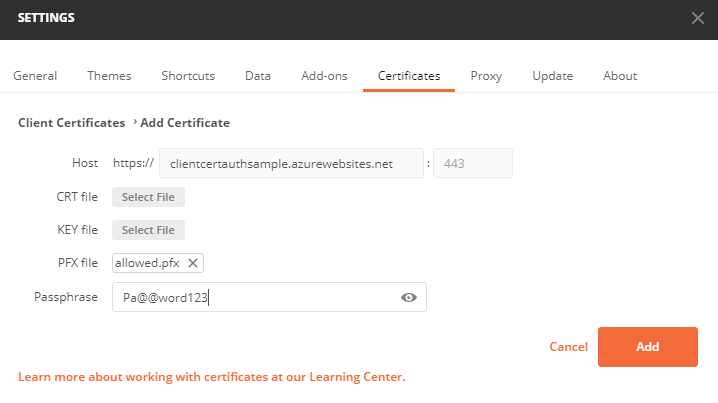
The next step is to specify allowed.pfx to be used for calls to the base URL of you Function App instance:
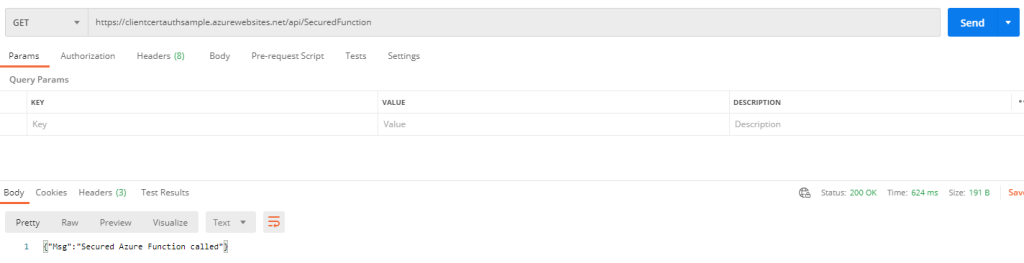
When the request is sent to the secured Function now, the response indicating successful invocation is received:
When denied.pfx is used with the request instead, the call is not authorized and the response is identical to the one received when no certificate was included.
GitHub repository
The code from this post is available from GitHub: https://github.com/matejbob/ClientCertificateAuth.git . The solution contains another project named Client that serves as a sample C# client calling our Functions and including the client certificate. Note, the target URL must be changed in Program.cs in order to be able to perform calls to the Functions.